


Every developer who uses AI coding agents has lived this moment.
You’re deep into a project. Claude Code, Cursor, or Windsurf is humming along, understanding the architecture, following the patterns, making good decisions. Then something interrupts the session — you close the window, run out of credits, switch models, or simply pick up the project the next day.
You come back. You start a new session. And your agent has no idea what you were building.
It hallucinates. It suggests patterns you already rejected. It asks questions you answered two sessions ago. It ignores the architectural decisions you made. You spend 20 minutes re-explaining the project before you can even start working again.
I lived this multiple times per day.
The manual ritual that changed everything
I work as an automation and AI developer at Gear SEO, building systems on top of Claude Code, Cursor, Windsurf, and Kimi. Losing context was costing me hours every week.
At some point, I started creating Markdown files to orient my agents before each session. A file with the project overview. A file with architectural decisions. A file with the current task list. A file with rules the agent had to follow. A file with what was done and what was pending.
It felt excessive at first. But the results were immediate.
Sessions resumed in seconds instead of minutes. The agent stopped suggesting rejected patterns. Hallucinations outside the project scope dropped to near zero. Token consumption went down because I wasn’t re-explaining context on every session. And my deliveries got better — because the agent was always working from a complete, accurate picture of the project.
I kept refining the document set. Added ADRs (Architectural Decision Records) to capture why decisions were made, not just what they were. Added a development diary to track what happened each session. Added a constitution to define what the agent must and must never do.
After a few months, I had a stable framework of 10 documents that I recreated manually for every new project.
That’s when I realized: this is exactly the kind of repetitive, structured work I should automate.
What is Squidy
Squidy is an open source Python CLI that interviews you about your project and generates the complete governance structure automatically.
You run one command:
pipx install squidy
squidy init
An AI agent (OpenAI or Anthropic — your choice) asks you a few questions about your project in natural language. What are you building? Who is it for? What tech stack? What architectural decisions have you made? What are the rules?
Based on your answers, Squidy generates 10 structured Markdown files:
my-project/
├─ readme-agent.md        # Boot instructions — agent reads this first
├─ .squidy/
│  └─ AGENT.md            # Auto-loaded by Claude, Cursor, and other agents
├─ doc/
│  ├─ constitution.md     # Principles, prohibitions, Definition of Done
│  ├─ oracle.md           # Architectural Decision Records (ADRs)
│  ├─ kanban.md           # Task board with sequential IDs and acceptance criteria
│  ├─ emergency.md        # Critical blockers log
│  ├─ session-context.md  # Current state: done, pending, next steps
│  ├─ policies.md         # Code conventions, naming standards, style guide
│  └─ diary-index.md      # Consolidated index of all diary entries
└─ diary/
   └─ 2026-02.md          # Daily log: what was done, why, and what happened
From that point forward, any agent that starts a new session reads readme-agent.md first and immediately has full context. Claude Code loads AGENT.md automatically. The agent knows what you’re building, what decisions were made and why, what’s done, what’s pending, and what it must never do.
A real demo session
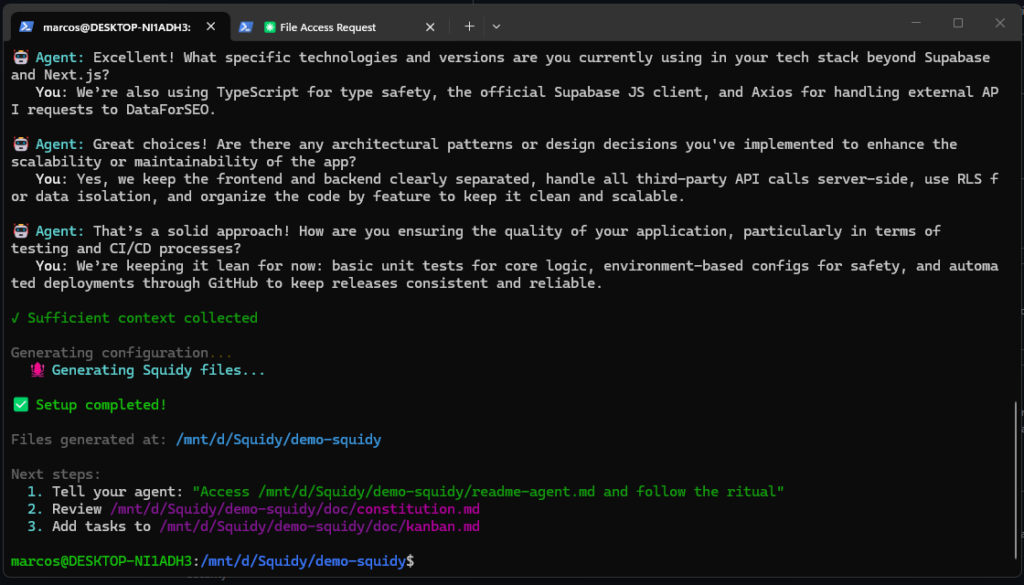
Here’s what a typical squidy init looks like in practice:
$ squidy init

🤖 Agent: Hi! Tell me about the project you want to configure.
   You: It's an SEO analytics web app built with Supabase on the
        backend and Next.js on the frontend, integrating with the
        DataForSEO API.

🤖 Agent: Great! Tell me more about the primary problem this web
          app is solving for its users.
   You: It helps users stop juggling spreadsheets and external tools
        by centralizing DataForSEO data in one place where they can
        query, store, and analyze it easily.

🤖 Agent: Who are the main users of this web app?
   You: SEO professionals and small agencies who need fast, reliable
        keyword and SERP data without building their own backend or
        handling raw APIs.

🤖 Agent: Are there any specific architectural patterns or design
          decisions you've implemented?
   You: Yes — modular structure, all external API calls server-side,
        RLS in Supabase for data isolation, organized by feature.

✓ Sufficient context collected (5 questions)
✅ Setup completed!

Next steps:
  1. Tell your agent: "Access readme-agent.md and follow the ritual"
  2. Review doc/constitution.md
  3. Add tasks to doc/kanban.md
Five questions. Ten files. Your agent is ready to work.
Why this works: context engineering, not prompt engineering
There’s a subtle but important distinction here.
Prompt engineering is about crafting the right message for a single interaction. Context engineering is about building the persistent structure that makes every interaction informed, consistent, and traceable.
Prompt engineering is a conversation. Context engineering is a system.
The governance files Squidy generates aren’t prompts — they’re a living project memory. They grow as the project grows. The oracle.md accumulates ADRs as architectural decisions are made. The diary/ folder builds a daily history of what happened and why. The session-context.md gets updated at the end of each session so the next one picks up exactly where the last left off.
The agent isn’t just following instructions. It’s operating inside a complete project reality.
The results in practice
After adopting this workflow across multiple projects:
Zero context loss between sessions. The agent resumes in seconds, already knowing the full project state.
Dramatically fewer hallucinations. When the agent has a constitution defining what it must and must never do, and an oracle explaining why architectural decisions were made, it stops inventing alternatives.
Lower token consumption. No more spending the first 10% of every session re-explaining the project.
Full traceability. Every decision has a record. Every session has a diary entry. If something breaks three weeks from now, you can trace exactly when and why a decision was made.
Better deliveries. The agent works with rhythm. It follows the kanban. It respects the policies. It doesn’t drift.
The philosophy behind it
The best software teams don’t rely on individuals remembering everything. They build systems — documentation, ADRs, retrospectives, sprint boards — that make the team’s collective knowledge explicit and persistent.
AI coding agents are powerful, but they’re also stateless. Without structure, every session is a blank slate. Squidy applies the same discipline that makes good software teams work to the AI-assisted development workflow.
The secret to quality is executing a well-structured process — even the steps that seem unnecessary. That applies to AI agents too.
Getting started
# Install
pipx install squidy

# Initialize your project
squidy init

# Tell your agent
"Access readme-agent.md and follow the ritual"
Requires Python 3.9+ and either an OpenAI or Anthropic API key.
- 🌐 Site: squidy.run
- 🐙 GitHub: github.com/seomarc/squidyrun
- 📦 PyPI: pypi.org/project/squidy
- 📖 Docs: docs.squidy.run
It’s open source under MIT license. If you’ve felt the pain of losing AI context mid-project, I’d genuinely appreciate feedback, issues, and contributions. The framework is still evolving — there’s a lot of room to make it better.
If you try it, let me know what you think in the comments.



Deixe um comentário